Break And Hide The Plane Controls & Inputs
Master first-person dismantle inputs so every pry and deposit feels automatic.
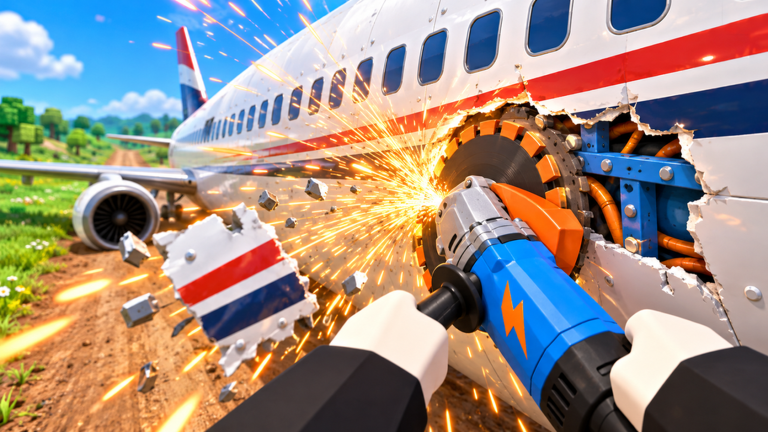
Break And Hide The Plane is built around first-person demolition. If your inputs feel clumsy, scrap rates collapse even with strong tools. This controls guide maps the actions you repeat every minute: aiming tools at the airframe, filling the sack, sprinting to the village, and opening the Gear Shop or Upgrade Book.
Core actions (all platforms)
| Action | What it does |
|---|---|
| Move | Walk or sprint between plane sections and the build site |
| Look / camera | Aim the tool tip at panels, bolts, and grind points |
| Primary interact | Swing pry, saw, smash, or grind on the targeted part |
| Stow / swap tool | Cycle crowbar, saw, grinder, or other unlocked gear |
| Deposit / deliver | Empty a full sack into the village build progress |
| Open menu | Reach Codes, settings, Gear Shop, Upgrade Book, crates |
Exact key labels can shift after UI patches — if a prompt appears on-screen, trust the prompt over memory. Recheck Updates after large clients.
PC keyboard and mouse
PC players get the sharpest aim for cutting thin seams. Use mouse look to trace panel edges, click or hold the interact key to apply tool damage, and keep WASD strafing so you do not stand inside falling debris. Bind sprint somewhere comfortable; sack runs are a huge part of cycle time.
When the Gear Shop or Upgrade Book opens as a world interactable, walk into the highlighted zone and press the interact key shown. If a Codes button lives on the HUD, click it without leaving first person whenever possible so you stay oriented toward the plane.
Mobile touch controls
On phones and tablets you will see a virtual joystick plus action buttons. Keep thumbs relaxed — dismantle sessions are long. Pinch or use the look pad to fine-aim saws along fuselage lines. Deposit buttons sometimes sit near the jump control; practice one empty-handed run to the village so you do not mis-tap mid-carry.
Lower graphics if scrap particles tank the frame rate. Smooth camera movement matters more than max settings when you are grinding dense engine blocks.
Console controller tips
Controllers handle movement well but need sensitivity tuning for precise panel edges. Increase look sensitivity slightly for saw work, then reduce it if you overshoot deposit prompts. Use the face-button interact for tool swings and the D-pad or bumper for tool swaps if the build supports it.
Sack and delivery ergonomics
The hidden skill is pathing, not button mashing:
- Face the next panel before the current one breaks so the camera stays productive.
- Watch sack capacity UI; leave when full instead of over-swinging.
- Sprint a clean line to the build site — memorize landmarks from Village Building.
- Deposit, turn, and sprint back without opening menus unless you are shopping.
Tool-specific control notes
- Pry / crowbar — short swings, great for doors and plates; keep rhythm steady.
- Saw — hold along seams; strafing while sawing increases effective cut length.
- Smash — commit to heavy hits on chunky parts; do not spam if stamina or cooldown exists after a patch.
- Grind — stay locked on metal edges; micro-adjust camera instead of walking off the part.
Ranked tool advice lives on the Tools Tier List and Gear and Upgrades.
Accessibility and comfort
Take breaks during long chapter pushes. First-person grind games can strain wrists and eyes. On mobile, play landscape for wider tool aiming. On PC, raise UI scale if sack numbers are hard to read.
Practice routine (10 minutes)
- Spawn at Hangar Yard and stand still while you identify every HUD element.
- Break three panels with each starter tool to feel timing differences.
- Fill one sack and deposit without opening any shop.
- Open Gear Shop once, note prices, close it, and return to cutting.
- If you play co-op, practice not blocking teammates’ camera lines (Co-op Guide).
Related pages
- Getting Started
- How to Dismantle the Plane
- Codes redemption UI tips on How to Redeem
- Upgrade Checklist
Recalibrating after a new tool
Swing-speed mods change timing. After any Upgrade Book rank, spend thirty seconds on scrap panels you already opened instead of diving into a dense engine block. That short recalibration prevents whiffed deposits and mis-aimed saw lines for the next several minutes.
Frequently Asked Questions
Quick answers for Break And Hide The Plane players.
Is Break And Hide The Plane first person only?
The official loop is described as first-person pry, saw, smash, and grind. Play in that camera mode for the intended aiming.
Can I play with a controller on PC?
Roblox controller support usually works when the experience enables it. Test interact and tool-swap buttons in a short private session first.
Why do I keep missing deposits?
Approach the build site squarely, wait for the interact prompt, and avoid sprinting past the trigger while looking at the sky.